Showing posts with label File Poller Activity. Show all posts

Tibco Data Transformation/Mapper Feature

In this walk through, I would brief about mapping features in TibcoBW.
Below is our source schema consist of multiple repeating records and our requirement is to map it to single party destination node which is also a repeating node.
Here is the destination schema, where party node is repeating and each party node can only have child nodes of info with in party.
In TibcoBW process, we would use file poller and xml parse to render data into BW process and then use DataMap activity to achieve the mapping logic.
In input tab of DataMap activity, Right Click on Party node, choose Statement and then Duplicate. This would create a party node and complete the mapping from source Submitting party to Duplicate Party Node.
Similarly, on the contact node of duplicated party; Right Click on Contact node, choose Statement and then Surround With Choice Option. Map the contacts from Submitting Party Source to Duplicated Party Contacts as shown above.

As there is similarly logic of Contact mappings for all the party node, this can be copied and pasted to the other maps as well. Below, shows the mapping of Party Node from source to Party node in destination using For-Each logic and contact mapping is copied and used over here.
Lets run the project and test the output.
The video demonstration is available on the YouTube, here is the embedded video.

Introduction to Tibco Business Works


In this article, I would brief about the Business Process in Tibco and define a process to poll for order request from file directory and map it to destination format.
Lets create tibco bw project through Tibco Designer as shown below,
Once, we created project lets add a new folders namely BusinessProcess,Schemas and Connections. 
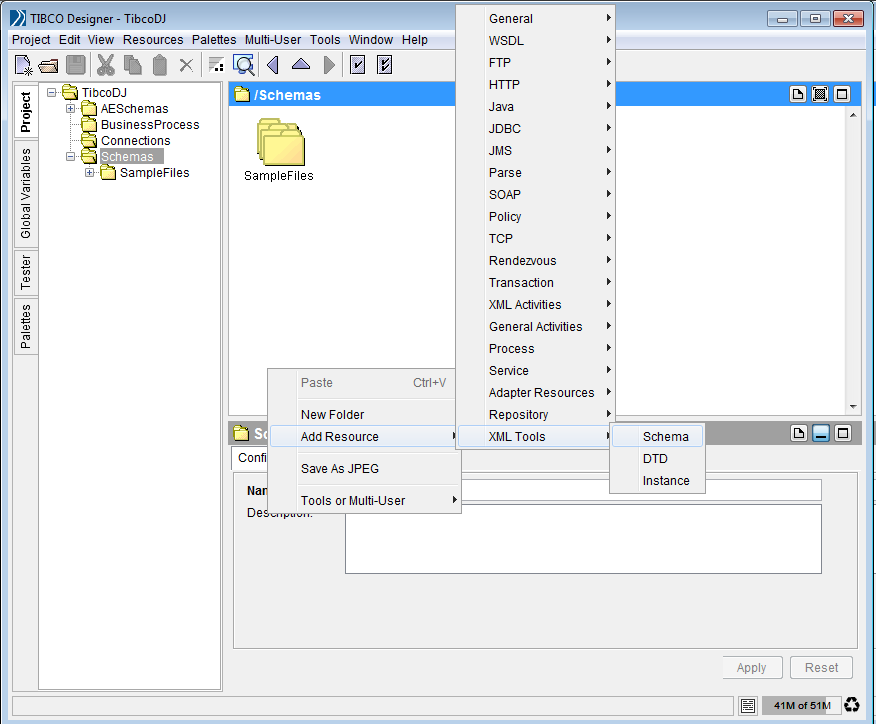
Open Schemas and on the right canvas, right click and choose Add Resource and select XML Tools and then Schema to define schema. Name it OrderRequest.

 Re-name the root node and change the content to element
Similarly, add Header with content as element and on the content model of OrderRequest include Header element and then add EventCode as typed content and include it in Header, Content Model.
In similar fashion, we should add ProductList and DocumentList with Product and Document child nodes as shown below. Change the target namespace.
 Here, is the outbound format schema.
Let now, define a process. Right Click on the canvas and choose Process and Process Definition.
Below, is the process empty having start and end activity. From palettes section, choose file palette and then drag and drop file poller and parse xml activities.
Click on create transition and connect file poller and parse xml. In File Poller activity, configure the file name and other properties as shown,
In configuration tab of Parse XML activity, choose text as input style and in output editor tab add child with content type as xml element reference and then browse for inbound schema as shown. Finally, in input tab, map the textcontent from output of file poller to parse XML.
 Then bring in remove file and map data activity,set XML schema reference in input editor and map the source data from Parse-XML to OrderDetails.
Then bring in Render XML and Write File activities, configure activities as below.
Lets run the BW process, from tester tab click run to start the process. File poller, pick up file in the source directory and transform to output format shown below. This process can be refactored still.
Stop the process and go to GlobalVariables (GV) tab and click on Open Advance Edit icon and using add variable group and variable options add variables as shown.
Click on ok and go to BW Process and instead of sequentially deleting the file, we would enable parallel flow using null activity and functionality of map data can be achieved using Render XML activity as shown below.
In file poller and write file activities, drag and use the GVs as shown below, save the process changes and execute to verify the functionality.

The video demonstration is available on the YouTube, here is the embedded video.